


Beautix - AI Hair Changer
4.329.00 Reviews
App Specs
- Version
- 1.3.4
- Updated On
- License
- Free
- Downloads
- 1,000,000+
- Developer
- Growly
- Categories
- Photography
- Platform
- Android
Screenshots

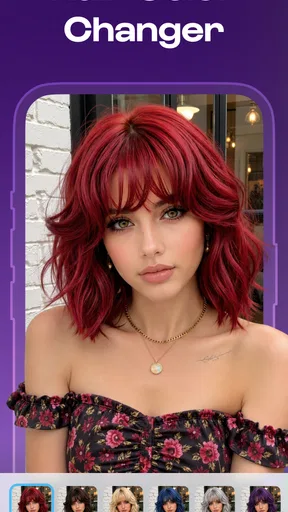
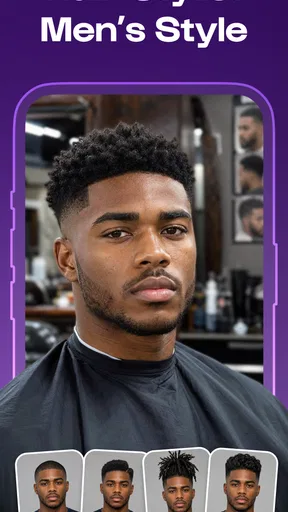
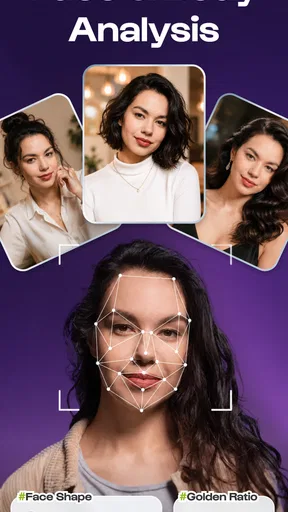


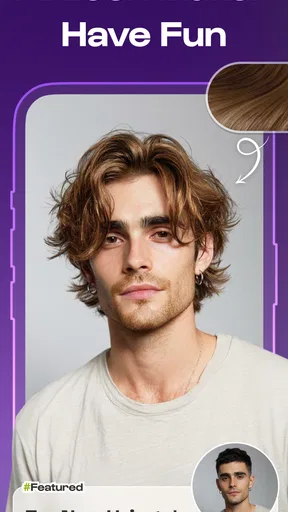

 Analysis by AppCompare
I’d treat Beautix as a visual try-on tool, not as a promise that a future haircut will look exactly like its preview. Its appeal is simple: use a photo to explore different hairstyles and hair colors before making a real change. That can make a salon conversation less vague, and it can also help someone who is curious about a dramatic look but not ready to commit. The useful question is not just whether the result looks attractive, but whether the app is comfortable to use and whether its preview gives you enough confidence to make a decision.
Trying a look without committing to it
Beautix is a free photography app from Growly, with optional in-app purchases listed at $89.99 per item. It is rated for Everyone, and the current version is 1.3.4. The app has an average rating of 4.3 from around 5,000 ratings, and it has over 1 million installs. Those figures suggest that plenty of people are willing to try it, but they do not tell you whether a particular hairstyle will suit your face or how easy the interface will feel for you.
My strongest reason to use Beautix is as a low-pressure way to narrow down ideas. Hair inspiration photos are often of people with different face shapes, hairlines, textures, and lighting from your own. A preview made from your photo can bring the conversation closer to your own situation. I would use it to compare broad directions—shorter or longer, warmer or cooler, more or less dramatic—rather than to choose a precise cut based on one image.
That distinction matters because an AI hair preview is an illustration, not a consultation with a stylist. Hair moves, falls, and reflects light in ways a static edit may not capture. A result can help you explain what you like, but it cannot reliably tell you how a style will behave with your hair’s natural texture or how much maintenance it will take. I’d bring a screenshot as a starting point for discussion, not as an exact specification.
Readability and getting oriented
The central task is easy to understand: start with a photo, then explore possible hair changes. That gives the app a clear purpose rather than asking you to learn a complicated photography workflow first. If you are comfortable choosing images and comparing visual results, the basic idea should feel familiar. The more important practical question is whether the controls and previews are legible on your particular device and comfortable for your eyesight.
When comparing looks, I recommend changing one thing at a time. First try a different length or shape while keeping the color close to your current one. Then explore color separately. This makes it easier to tell whether you prefer the cut, the shade, or simply the novelty of seeing a different version of yourself. If you change several aspects at once, a striking preview can be hard to interpret and less useful for a real decision.
It also helps to begin with a photo in which your head is clearly visible and your hair is not obscured by a hat, hand, or strong shadow. This is not a special setting or guaranteed requirement; it is a practical way to give a visual editing tool a less ambiguous starting point. If the first result looks oddly placed or unconvincing, I would try another photo before concluding that the style itself is wrong for you.
Worth Reading Before You Choose

EA SPORTS FC Mobile 26 Is a Bigger Football Game, but It Takes Time

Flipboard Shows What News Apps Must Do Beyond the Feed

Switching to Android Auto Means Rethinking Your Driving Routine

Google Calendar Makes a Crowded Week Easier to Manage

Ludo King Makes the Most of the Minutes Between Plans

Baby Panda World Brings Quick Play to Modern Phones, but Its Game Library Feels Busy
For users who find dense interfaces tiring, the narrow purpose may be an advantage: you are there to inspect hair options, not to navigate a broad photo-editing suite. At the same time, visual tools can be demanding if labels are small, controls are crowded, or the result requires careful inspection. I would judge comfort in a short first session, rather than assume that a simple concept automatically means an accessible interface.
Motor and sensory comfort
Hair try-on is a visual task, so it naturally favors people who can comfortably look at and compare images. If you have low vision, color-vision differences, or sensitivity to bright screens, the most useful result may not be the most vivid one. A very subtle shade change can be difficult to evaluate on a small display, while a dramatic edit may be easier to notice but less representative of a real salon outcome. Increasing your device’s text or display size, if you already use those settings, may help with general viewing, though it will not change how the app renders hair.
There is also a motor consideration that is easy to overlook: taking or selecting a photo and moving between visual choices can involve repeated taps and precise attention. If repeated interaction is uncomfortable, keep the session focused. Pick a small set of realistic options, compare them in one sitting, and stop once you have a useful direction. The app is better approached as a short decision aid than as an endless browsing task.
For sensory comfort, I would avoid making a decision while distracted or in a setting where you cannot inspect the image carefully. Color appearance changes with screen brightness and surrounding light, and a quick glance can make two shades seem more alike—or more different—than they are. If you are comparing a subtle brunette or blonde variation, revisit the preview in steady lighting and at a comfortable screen brightness before treating it as meaningful.
These are practical ways to make a visual app easier to use, not claims that Beautix offers specialized accessibility controls. People who rely on spoken descriptions, keyboard navigation, or highly adjustable interfaces should check whether the app works with their usual device tools before depending on it. If image-based interaction is not a comfortable way for you to make choices, a stylist consultation or a trusted person’s help may offer a clearer route.
Where it fits into everyday life
A realistic use case is preparing for a salon appointment. You might be considering a shorter style but struggle to describe what “a little above the shoulders” means. A few previews can help you identify whether you prefer a blunt outline, a softer shape, or a different general length. I would save or show only the options that genuinely appeal to you, then ask the stylist what would translate well to your hair and routine.
It can also be useful when you are deciding whether to experiment with color before an event or seasonal change. Rather than arriving at a salon with a reference image that uses different lighting and hair texture, you can use your own photo to see whether a broad color family feels appealing. The preview cannot settle questions about upkeep, fading, or the process needed to reach a shade, so those still belong in the conversation with a professional.
Compared with ordinary photo editors, Beautix is more focused on trying hair changes than on polishing a picture with general-purpose adjustments. Compared with browsing social media or hairstyle galleries, it offers a more personal point of reference because the starting image is yours. The trade-off is that a gallery may show real hair in natural movement, while an AI preview can make a look seem more seamless than it would be in everyday life. I would use the two approaches together: use Beautix to explore your direction, then look at real examples to understand texture and styling.
If you simply want to make a finished portrait look better, a conventional photo editor may be the more suitable choice. Beautix is aimed at people asking, “What might I look like with a different hairstyle or color?” It is less appropriate if you expect precise salon planning, a reliable assessment of hair health, or a realistic forecast of how a cut will sit after washing and styling.
What the preview can—and cannot—settle
The biggest limitation is the gap between a still image and real hair. A preview may help you judge an overall silhouette or color direction, but it cannot show how a fringe behaves when you move, whether layers will suit your hair density, or how much daily styling a cut requires. These details can matter more than the initial visual effect. I would avoid choosing a high-maintenance look solely because one generated image is flattering.
Another limitation is that your starting photo shapes the usefulness of the comparison. A photo taken under warm indoor light may make color judgments less dependable than one with more neutral lighting. A partially hidden hairline or an unusual angle can also make a preview less helpful. The sensible response is to test a second clear photo, not to keep adjusting your expectations around an image that is already giving you an unclear result.
The pricing deserves a little attention before you spend much time exploring. The app is free to download, while in-app purchases are listed at $89.99 per item. That is a substantial listed price for an optional item, so I would check the purchase screen carefully and make sure you understand what an item includes before confirming anything. You do not need to treat a paid option as necessary simply because it appears while you are exploring; decide first whether the free experience answers your question.
Beautix was released on June 14, 2026, and its minimum operating-system requirement is version 7.0. If you are using an older device, checking compatibility before planning a session can save frustration. The app’s content rating is Everyone, which makes its intended audience broad, but that rating is about content suitability rather than a guarantee that every interaction will work equally well for every ability or device setup.
Who is likely to benefit
I think Beautix makes most sense for someone who has a specific hair question and wants a visual aid before acting: a person weighing a new length, comparing a few color directions, or trying to explain a preference to a stylist. It can also suit someone who enjoys experimenting privately, without the pressure of asking for a real change straight away. Its value comes from turning an abstract idea into something you can react to.
I would suggest skipping it—or treating it as only one small part of the decision—if you need highly dependable color matching, detailed advice about hair texture, or a preview that accounts for movement and upkeep. It may also be the wrong choice if visual comparison is difficult for you or if an app-based photo workflow is uncomfortable. In those situations, real-world references, a stylist’s guidance, or a friend who understands your preferences may be more useful than another simulated image.
My practical recommendation is to go in with one question, use a clear photo, compare a limited number of options, and treat the result as a conversation starter. Its best quality is helping you explore a change before committing, while its main weakness is that a polished image can suggest more certainty than a simulation deserves. If you keep that boundary in mind, the app can be a handy photography tool rather than a substitute for professional advice.
Overall, Beautix is worth trying if you want a personal visual reference for hairstyle and color ideas and are comfortable making judgments from images. Growly’s app has attracted an average rating of 4.3 and over 1 million installs, but the right choice still depends on your needs: use it to discover what appeals to you, then decide with realistic expectations and, when a major change is involved, a stylist who can assess your actual hair.
Pros
- Quickly previews different hairstyles without visiting a salon.
- Useful for exploring hair colors before making a change.
- AI-generated results make experimenting easy for beginners.
- Can help you shortlist styles to discuss with a hairstylist.
- Virtual try-ons avoid the commitment of an immediate haircut.
Cons
- Results may look unrealistic around hairlines or facial edges.
- Lighting and photo quality can affect the accuracy of previews.
- AI suggestions may not reflect your hair texture or thickness.
- Some features or styles may require payment or in-app purchases.
- A virtual preview cannot guarantee the same result in real life.
FAQs for Beautix - AI Hair Changer
What is Beautix - AI Hair Changer, and what can it do?
Beautix - AI Hair Changer is a photo-editing app designed to let you preview different hairstyles using AI. You can use it to explore looks such as changes in hair length, style, or color on a photo, helping you compare ideas before visiting a salon. Results depend on the photo and the app’s available tools, so treat previews as inspiration rather than a guaranteed prediction of how a style will look in real life.
How do I get the best hairstyle results in Beautix?
For a clearer preview, choose a well-lit, front-facing photo in which your face and hair are easy to see. Keep your head unobstructed and avoid strong filters, heavy shadows, or accessories that cover your hairline. AI edits can look less convincing when the source image is blurry, taken at an unusual angle, or crowded with other people. You may need to try more than one photo or hairstyle to find a result you like.
Is Beautix - AI Hair Changer free to use?
The app may offer some features or previews without charge, while access to additional styles, edits, or other tools can depend on its current pricing and subscription options. Check the app listing and in-app purchase details before starting a trial or confirming payment, including the renewal period and cancellation terms. Prices and available features can vary by platform, region, and app version, so verify the information shown on your device.
Does Beautix upload or store my photos?
Photo handling can vary depending on how the app processes its AI edits and on the permissions you grant. Before selecting a personal image, review Beautix’s privacy policy and the data-safety information on its app-store listing to understand whether photos are processed on your device or sent to a service, and how long they may be retained. Avoid uploading sensitive images, and revoke photo-library access in your device settings if you no longer want the app to use it.
Can I use Beautix hairstyle previews to decide on a real haircut or hair color?
Beautix can help you compare possible looks, but an AI preview is not a precise salon consultation. The result may not account for your hair texture, thickness, natural color, growth pattern, or the time and care a style requires. Use a preview as a conversation starter with a professional stylist, and ask about what is practical for your hair before making a major cut or color change.


